
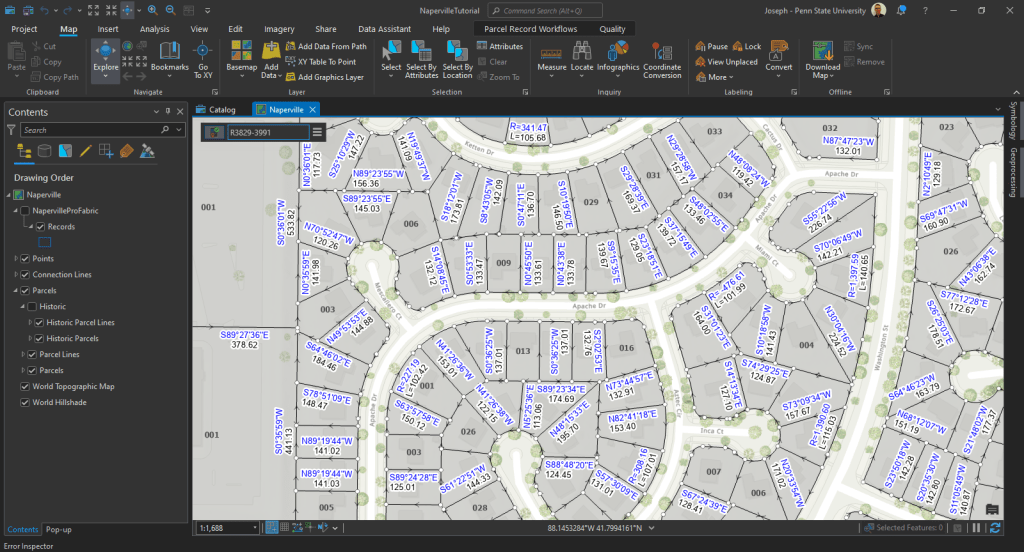
A city’s parcels dataset is used to maintain ownership and tax information, record zoning and other planning designations, track annexations, maintain corporate boundaries, and develop future land-use plans.
(Foster and Blanford) 1
ArcGIS Parcel Fabric – Records Feature Class:
What is a “Records” feature class? It’s derived from from legal descriptions filed in county recorder offices and includes detailed measurements for property dimensions and public rights of way.
Geometry and Connectivity
- Geometry: Features in the Records feature class correspond to the extent of parcels associated with each record. How is this possible?
- Connectivity with Other Feature Classes:
- Relationship Classes: One-to-many relationships between Parcel Type objects (e.g., lot polygons) and the Records feature class using GlobalID keys and Created By Record fields.
- Must Have a Record Attribute Rule: A validation rule ensuring every parcel (both polygon and line) is associated with a record.
Creating and Assigning Parcels to a Record
- Step-by-step process:
- Select a parcel lot.
- Go to the Records tab and create a new record (e.g., LandTransaction1).
- Set a Recorded Date and create the record.
- Assign the selected parcel to the new record.
- Result: The record feature now has associated geometry and labels, including the parcel polygon and lines.
Minimum Topology rules required by the parcel loader to load data to the fabric
- { LINES } Must Not Self-Overlap
- { LINES } Must Not Self-Intersect
- { LINES } Must Not Intersect or Touch Interior
- { LINES } Must Be Covered by Boundary Of
- { POLYGONS } Boundary Must be Covered By
- { LINES } Must be Single Part
- Improving Cadastre: development of a workflow prototype utilizing ESRI’s parcel fabric by Foster, Linda M; Blanford, Justine I
Journal of the Urban and Regional Information Systems Association, 07/2013, Volume 25, Issue 2 ↩︎
 Joseph Kempf
Leave a comment